
Make a film
Models and effort
AnimSpark has three models, Ultra, Pro and Flash, and three effort levels. Pick both from the chip under the composer.
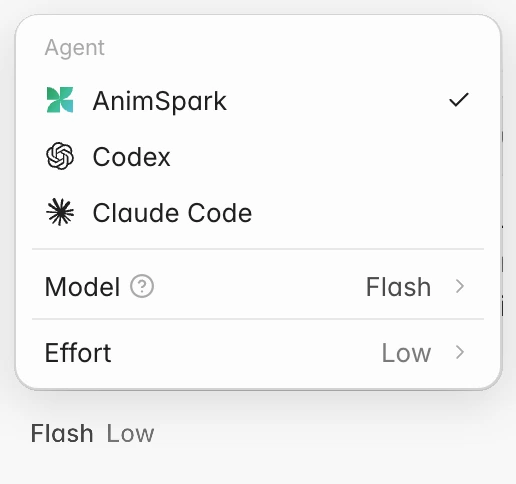
The chip under the composer shows your model and effort, for example Ultra Max or Flash Low. Click it to open the menu, then hover Model or Effort to see the options.
The three models
Every model turns one prompt into a finished film. They differ in how much complexity they can handle. In the app, click (?) next to Model to open the same comparison.
| Flash | Pro | Ultra | |
|---|---|---|---|
| Quality | Normal | Higher | Highest |
| Image and file upload | Supported | Supported | Supported |
| External tools | Limited tools | All tools: search, generation and more | All tools: search, generation and more |
| Narration voice | Standard | Natural | Cinematic |
| Music and sound | Limited library music and sound effects | Adaptive score, background music and layered sound effects | Full audio direction: music that follows the story |
| Long-form polish | Solid up to a few minutes | Sustained quality on long cuts | Deep, shot-by-shot polish on the longest cuts |
| Speed | Fastest | Fast | Medium |
| Credits usage | Lowest | Medium | High |
| Best for | Daily content and short films | Brand films, data stories and complex narratives | The hardest, longest productions where quality is everything |
Flash is on every plan, including Free. Pro and Ultra come with every paid plan.
Effort
Effort sets how much thinking the model puts into the work: Max, High or Low. Low is the default.
- Higher effort takes longer and uses more credits.
- It doesn't change what the model can do. Flash on Max is still Flash.
- Effort is never locked to a plan. Every plan can use every effort level on the models it has.
How the model changes what you spend
Credits are charged for what a run actually uses: the model's thinking, plus the narration, music, sound, images and video clips it makes. So a bigger model or a higher effort costs more for the same film. See Plans and credits for how that works.
Changing model mid-project
The model and effort apply to the next message you send. You can make the first cut on Ultra and ask for small fixes on Flash, or the other way round.
Other agents have their own models
If you switch the composer's agent to Codex or Claude Code (Mac app), the menu shows the models and effort levels that agent offers instead, plus Media quality. See Switch the agent.