
Agents
Switch the agent
In the Mac app, the composer can run Codex or Claude Code instead of AnimSpark's own agent, on your own ChatGPT or Claude plan.
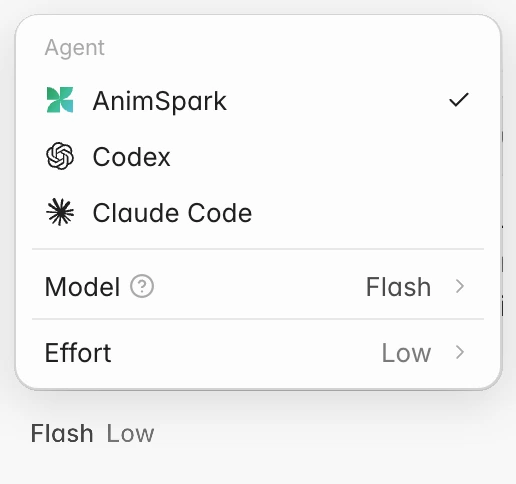
The composer has an agent. By default it's AnimSpark, with the Ultra, Pro and Flash models. In the Mac app you can switch it to Codex or Claude Code: they write and edit the film, and AnimSpark supplies the video, image, voice, music and rendering tools.
The choice applies across the app on this Mac: every project stored on this Mac uses the agent you picked, and projects in the cloud always use AnimSpark.
Where it works
| AnimSpark | Codex / Claude Code | |
|---|---|---|
| Web app | Yes | No. In a project, the menu shows them with a Mac app tag that tells you about the Mac app |
| Mac app, project in the cloud | Yes | No. The menu says Works in projects stored on this Mac. |
| Mac app, project on this Mac | Yes | Yes |
Switch
Install and sign in to the agent
Codex or Claude Code must be installed on your Mac and signed in. AnimSpark finds your own installation, including the one that comes with the ChatGPT, Codex or Claude desktop app; it doesn't install one for you.
Open the agent menu
In a project stored on your Mac, click the chip under the composer (it shows the model, like Ultra Low). The Agent section lists AnimSpark, Codex and Claude Code.
Pick Codex or Claude Code
If the agent isn't found, its row says Not found; click it and the menu explains that no installation was found on this Mac, with a Get Codex / Get Claude Code link to its install page. If it isn't signed in, press Sign in: Terminal opens with the agent's login command, and the menu updates when you come back.
Choose the model, effort and media quality
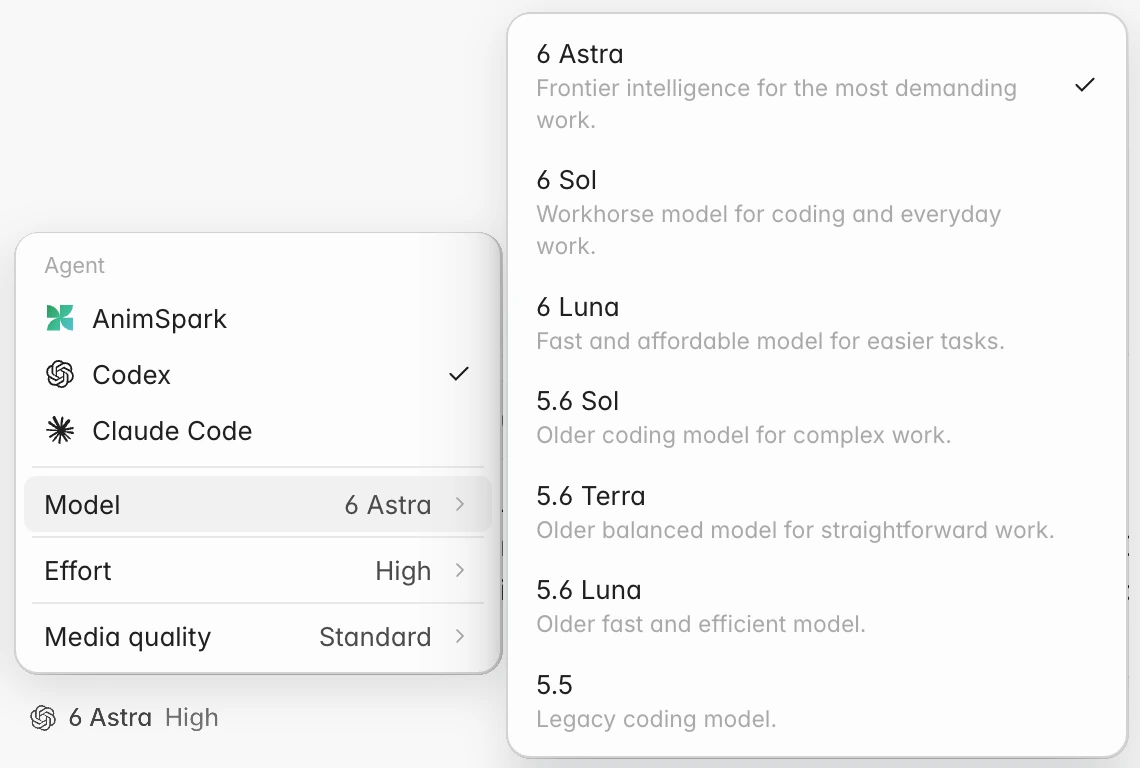
The menu now shows that agent's Model and Effort, read from your installation, plus Media quality. The chip shows the agent's icon with your model and effort.
Models and effort
The menu shows the models and effort levels the installed agent offers, so they match what you'd see in that agent itself and change when it updates. For example, a Codex installation might list a model called 6 Astra.
Media quality
Codex and Claude Code write the film; the narration, sound, music, images and video they ask for are made by AnimSpark. Media quality sets how good those are:
| Tier | What you get |
|---|---|
| Standard | Library sound and music, draft images and video clips. Cheapest. |
| High | Natural voices, custom sound and music, sharp images and video. |
| Best | The best voice, image and video models. |
High and Best need a paid plan. This is the same setting as in the Third-party agents popover, so it applies to connected coding agents too.
Who pays for what
- The agent's thinking runs on your own ChatGPT or Claude plan, the same as when you use Codex or Claude Code directly.
- Media and rendering tools (narration, sound, music, images, video clips) run on AnimSpark and spend your AnimSpark credits.
- Video clips always ask first, with the credit estimate, whichever agent is working.
Good to know
- Files and references. Files you attach are copied into the project's Uploads so Codex or Claude Code can open them; if one can't be copied, the chat says so. Whatever you point at with
@(a moment, a selection, a file) is described to the agent with your message. - Their own style. In the chat you'll see their steps as they work, including the files they read and edit and the commands they run, and the footer names the agent, model and effort.
- Interrupted runs show Try again instead of Resume.
- Switching back to AnimSpark is one click in the same menu.
To drive AnimSpark from a coding agent's own window instead, see Drive AnimSpark from your coding agent.