
Make a film
What the agent does
From your brief to a finished cut. The agent writes the story, builds the motion, makes the images, video, narration, music and sound, cuts it all on a timeline, and checks its own work.
When you send a brief, AnimSpark's agent works through the whole film on its own. The chat shows every step as a plain sentence, so you can follow along or leave it running.
The steps you'll see
The agent picks its own order, but a first cut usually goes like this. Each line reads in the present while it's happening (Writing a scene) and in the past once it's done, with repeats counted (Wrote a scene ×9).
Story and layout
It decides on the structure, the scenes and their timing, then puts them on the timeline. You'll see Writing a scene for each scene it builds and Arranging the timeline when it places them.
Motion
Each scene is animated motion graphics: type, shapes, diagrams, your screenshots and footage, moving on the beat. Scenes are built as code, which is why you can later click any word in the picture and retype it.
Images and video
It finds or makes the pictures the film needs:
- Searching visuals for stock images. Type is chosen as part of each scene — there's no separate font search.
- Generating image for images made to order, on every model.
- Cutting out the subject to lift a product or person off its background.
- Generating video for video clips (Pro and Ultra). This one always asks you first, with an estimate of the credits. Choose Generate or Skip; if you skip, the agent carries on without the clip.
Narration
Choosing a voice, then Recording narration, line by line. Captions follow the narration. The voice depends on the model: Flash uses a standard voice, Pro a natural one, Ultra a cinematic one. Ask for a particular kind of voice in words ("a calm male voice").
Music and sound
Composing music and Making a sound effect. On Pro and Ultra the agent composes a score and designs layered sound for the film. On Flash it picks music and sound effects from a library.
The cut
Arranging the timeline: scenes, footage, narration, sound effects and music, each on its own track, timed together. It's the same timeline you can edit afterwards.
Self-checks
Before it hands the film over, the agent reviews it: Previewing the film, Checking the film, Looking at frames and Listening back. If something looks or sounds wrong, it fixes it and checks again.
When it's done
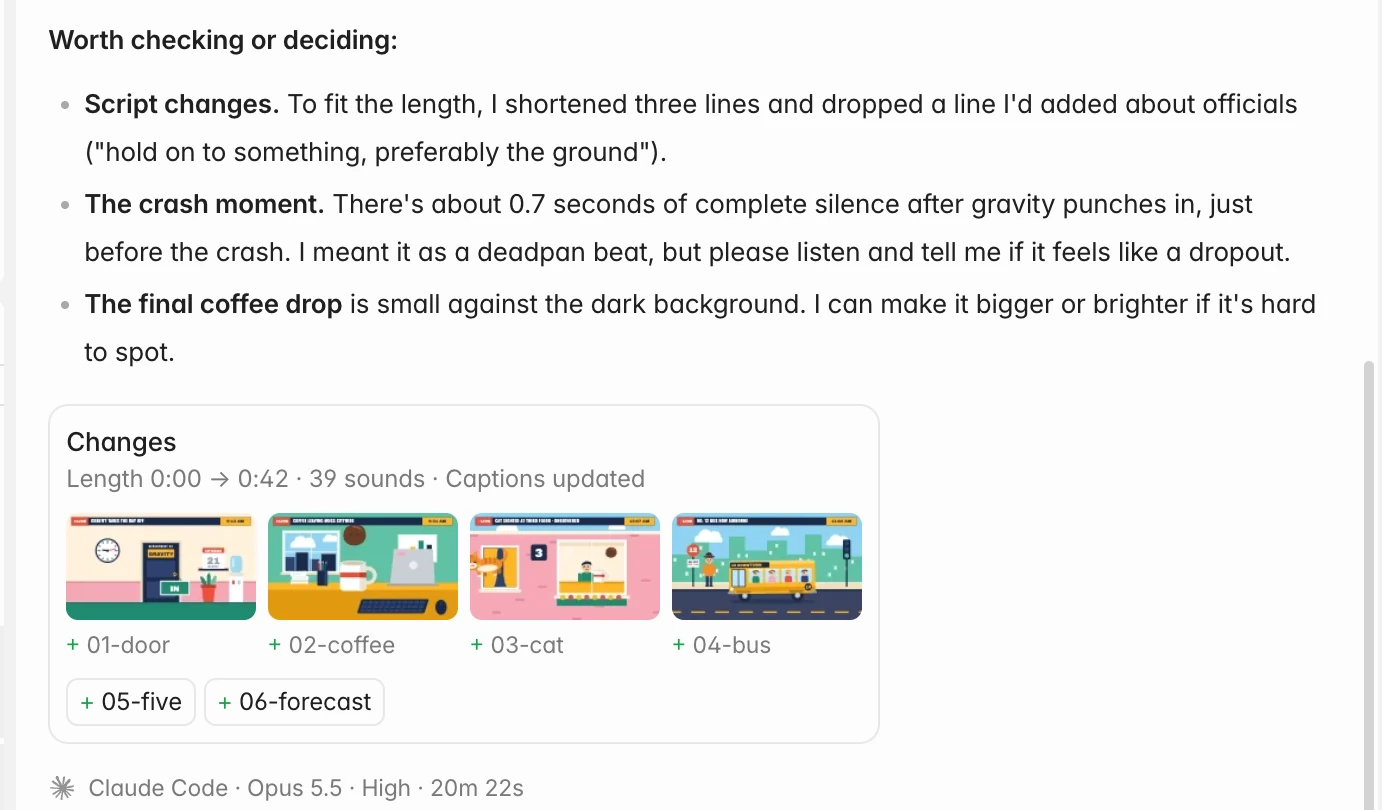
The agent tells you what it made, and if the round changed the film, a Changes card sums it up:
- the film's length (for example Length 0:00 → 1:06 when it changed), how many sounds were added or edited, and whether captions or the picture changed;
- the scenes that were added (+), edited (~) or removed (−), as pictures and chips. Click one to jump there on the timeline.
The steps fold into one line, like Worked 6m 48s · 23 steps: right away if you weren't watching, or when you send your next message if you were. Click it to open them again. Narration, sound and images the agent made stay visible under it, and you can play them from the chat.
Below each answer, a line names who did the work: the agent, the model and how long it took.
While it works
- Keep typing. Press Enter during a run and your message is queued: it stays in the box and sends when the run finishes. Choose Don't send to take it back.
- Stop it. The send button becomes Stop (or press Esc). You're only charged for what was already used.
- Leave it. Runs keep going in the background, and Projects at the top left shows which of your projects are in progress. See Running several projects.
- Answer questions. If the agent needs a decision, it asks with a few options and waits.
If a run stops
If a run is interrupted, or you run out of credits, a notice above the composer says why. Press Resume to pick up from the last checkpoint. You're charged only for what was used before it stopped. (When Codex or Claude Code was doing the work, the notice offers Try again instead.)
If a voice or music service is unavailable during a run, the film is still finished, and a notice says so (No narration or No background music). Ask again later to add it.